Sunday, July 18, 2021
Desky L Shaped Sit Stand Desk Assembly Guide
Watch video on YouTube here: https://youtu.be/6vO0zM1ZcLg

Thursday, July 15, 2021
Discover A Better Work Balance With Desky® Standing Desks - Engineered For Comfort
Watch video on YouTube here: https://youtu.be/L3UM8sIg0oA
Desky L Shaped Sit Stand Desk Assembly Guide
Watch video on YouTube here: https://youtu.be/ZvzAlfLphPw
Wednesday, July 7, 2021
Jordan Kahu Reviews The Desky Alpha Dual Sit Stand Gaming Desk
Chur everyone! Welcome to my first ever review. It's going to be on the Desky Alpha Dual Sit-Stand Gaming Desk. As you guys know, I love my gaming, so a good desk helps.
Watch Jordan’s video review of the Desky Dual:
Easy Setup And Installation
The setup to the Desky Dual Electric Standing Desk is super easy. Good instructions, not too many screws. It took me, probably, an hour, maybe, to set it all up by myself, so, obviously, if you had someone help you, it'll be a lot quicker than that. As you are aware, in the current world that we live in now, a lot of people are streaming and working from home. A lot of the time, it's been on one of these desks. Having a good desk, obviously, is going to help a lot.

My old setup was, I had one desk for gaming, and then I had another desk for all my editing. They are a bit separate and it was just annoying to float between both, take cords out, plug them into the other station and go back and forth. It was just a nightmare. To have it all in one place where I don't have to do any of that anymore is so important. I guess the only thing that's bad about it is that now, my PS5 is where I edit and where I edit is where my PS5 is.
User-Friendly Control Panel With Custom Preset Heights
One of my favourite parts about this desk is this control panel right here. Obviously, I've been an athlete myself, and when I'm sitting down, spending a lot of time, gaming, or editing, I need to stretch my legs every now and then, so, having these buttons help a lot. Obviously, these two buttons help you go up and down, and these desk height preset buttons you can set to whatever height you want. All you have to do is raise your desk to a height you'd like, press M, and then press the number you'd like it to be set to. This saves it as a preset. I have my sitting height preset at number 1 and I have my standing height preset at number 2.

Also, being a dad of 3 young kids, it's awesome to be able to put the desk this high, so my kids can't touch anything that's on the table or mess up any of the cords, a big bonus. Obviously, when I got this desk, I needed a couple of accessories to make it just that little bit nicer. I ordered the monitor arms. I ordered the headphone stand and I ordered the laptop stand. The laptop stand is just easy because I don't need two monitors. I can just get home, put the laptop straight onto the mount, open it up, and then go from there.

Dual LED Gaming Monitor Arms
A cool thing about the Dual LED Gaming Monitor Arms is the cool little LED lights set at down the bottom. There're also a couple of USB ports, headphone jack, and microphone jack. All you need to do is, with the cord that's provided, hook it up to your computer, and then you can use that to charge your own devices. Another cool accessory to have on this desk is this cable management organiser. It keeps all your cords and everything as neat as possible. There are a lot of cords when it comes to streaming and gaming so this came in super handy.
Desk Colour And Customisation
Obviously, you’ve got to clean this up a lot better, but there are, probably, 20 or 30 cables in there, and for them to not hang down like this, helps a lot. I chose the black desk because I wanted to go for that dark moody vibe in my office. Obviously, when I'm gaming, that's the type that I would go for so that's why I picked this table. Another awesome thing about this table is that it has all the room in the world for my gaming setup. Obviously, it has room for my PS5, my switcher, my microphone and my camera.

So yeah, there it goes, my first ever review on YouTube, the Desky Alpha Dual Sit Stand Gaming Desk, such a stunner of a desk where you want to sit down and start your game, stand up, stretch the legs, sit back down the rest of the game, keep going up and down up, up and down, up and down. I highly recommend that. I'll make sure I leave the links to the desk below and the links to Desky below, so you guys can go and check out what you think you might want for your home space, but right now, I'm going to go catch some dudes in the good leg. I'll see you guys next time, and as always, Chur!
The Desky Dual Standing Desk – Features and Specs
- Height range of 60-125cm
- Weight capacity of up to 140kg
- Height adjustment movement of 36mm/second
- Dual motor lifting system
- 10-year warranty on parts
- Anti-collision system
- Noise reduction at 40db in motion for almost-silence lifting
- Features stability and strength in our heavy-duty desk frame
- 3 stage telescopic legs
Considering the Desky Dual after Jordan’s video introduction? Personalise your desk to match your space with our range of desktops and finishes. You’ll also benefit from selecting one of our various desk shape options, for a more natural, comfortable ergonomic position.
How long will your desk last and what happens to our lifting motors over time? Backed up by our 10-year warranty on parts, our concealed motor system hidden in the legs on a durable frame will last the rigors of daily office tasks and gaming. This means your desk will be stable and reliable for years even with daily height adjustments from sitting to standing, while bearing heavy loads of equipment. Our dual-motor desks are also designed with a wide range of user heights in mind so you'll certainly be able to customise desk height according to your needs.
If you're looking for the perfect standing desk for your space, the Desky Dual Electric Standing Desk is sturdy, durable and ergonomic. Whether you want a stand-up or sit-down option depending on your mood, or whether you’d like to move more to improve your health, we think the Desky Dual is a great choice. With its customisable desktop design and choice of leg colour, you'll be able to choose the ideal configuration to suit your needs and aesthetic preferences. Plus, we've got lots of additional accessories like monitor mounts so that you can work comfortably at home or at the office without straining your neck! Want one? Get yours today by clicking here.
source https://desky.com.au/blogs/news/jordan-kahu-desk-review
How To Program The Desky’s One Touch To Continuous Touch Setting
In order to program the preset buttons from a one touch to a continuous press on your Desky Dual's control panel, you’ll simply need to follow these easy steps. If you’re still confused, we’ve got a helpful video that shows you exactly how to do it.
Whether it’s for your peace of mind, safety (those curious cats and kiddos!), or simply your own preferred method of use, you are able to change the height preset buttons from that one button press activation to a continuous press so you’ll never move your desk height by accident.
Then the preset will stop at that programmed height, but will require you to hold down that preset button until that height is reached.
Check out our video demo on how to change the one touch preset setting to a continuous touch setting on your Desky Dual:
How To Program The One Touch Preset Setting To A Continuous Touch Setting on the Desky Dual
- First and foremost, in any programming situation ensure all the cables to the control box under the Desky are firmly plugged in. Including the power cable, both yellow leg cables and the control panels.
- Then check the power outlet at the wall to ensure the securing place and switch on.
- Next, make sure there are no obstacles under your Desky as we will be bringing it down to its lowest height.
- To enter this program, press and hold the down button to bring the Desky to its lowest position.
- Once there press and hold the down button again until it displays RST.
- Next, press and hold the 1 button for 5 seconds until the display shows 10.2 and you are now going to change the setting to a continuous press.
- You will be able to switch back and forth between continuous or 10.1 which is the one-touch press setting by holding the 1 button.
- In order to exit the program mode, press the down arrow until the Desky bops up and down for a second, displays the lowest height, and your desk is now ready to be used. And that is how you change the preset functions from a one-touch to a continuous press on your Desky Dual's control panel.
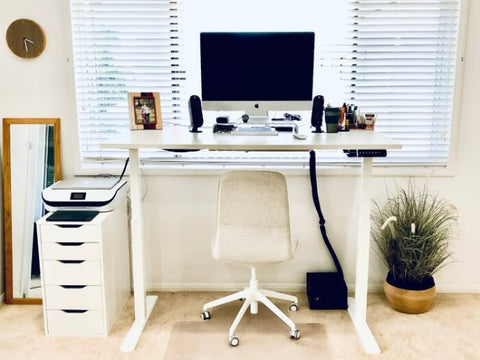
The Desky Dual Standing Desk – Features and Specs
- Height range of 60-125cm
- Weight capacity of up to 140kg
- Height adjustment movement of 36mm/second
- Dual motor lifting system
- 10-year warranty on parts
- Anti-collision system
- Noise reduction at 40db in motion for almost-silence lifting
- Features stability and strength in our heavy-duty desk frame
- 3 stage telescopic legs
Do you work more productively when standing up for a few hours? With the Desky Dual Electric Sit Stand Desk, easily switching from sitting to standing won't be an issue anymore. Our dual lifting motor is smooth and easy to use, meaning you can adjust your height without any difficulties or issues with a mere tap of a preset button. Working and standing at whatever height suits you best, our desk will allow you to get in some healthy movement while still remaining productive at work. Forget about sitting all day long - now you have the option to stand up if it suits your needs better.
At Desky, we know you need a table that can withstand whatever you're throwing at it. Are you addicted to your job? Or do you love gaming and need a dedicated gaming desk that can withstand energetic movements at the height of those gaming battles? The Desky Dual Electric Standing Desk has got durability and stability features like no other. Heavy-duty construction, 3 stage telescopic legs, and durable desk tops mean this desk will outlast even those most excited gamers.
But what if you’re looking for customisation options? Most people want their office to look professional. That’s why we offer a number of beautiful options for our Desky Dual Standing Desk: perfect whether you want something sophisticated and sleek or a vibrant and eye-catching wood finish!
Still looking and can’t decide? If you need a comparison of our top desk models, take a look at our Desk Buying Guide - we wrote it to help you choose the best desk for your space.
We think the Desky Dual is perfect for you if:
- Desk customisation is important to you
- You'd like to save time with fast desk height adjustments and presets
- You need an ergonomic desk that suits a wide range of user heights
- Your office desk has to bear heavy equipment (up to 140kg possible)
Ultimately, who could resist the conversion of their workspace on a single push of a button? Make sure your workstation is always as comfortable as you want it - with this desk every day will feel like a Friday! Check out the full range of Desky desks here and find the perfect sit stand desk for your office space.
source https://desky.com.au/blogs/news/program-continuous-touch-setting
Wednesday, June 23, 2021
How To Set Height Limitations on your Desky Dual Sit Stand Desk
To set specific height limitations on your Desky Dual, we’ve got some great tips to make your Desky life simple and efficient. Your Desky's default height range is from 60 cm to 124 cm in order to provide the widest range of heights to suit most users' ergonomic workspaces. However, you might want to limit this range depending on how you use the Desky within your home or office environment.
Setting a minimum or a maximum height under that default range can avoid accidental collisions with other furniture, for example, any equipment or drawers placed under your desk, as well as floating wall shelves placed above your desk. Let’s go ahead and learn how to set height limits on your new standing desk!
Check out our video on how to set height limitations on your Desky Dual:
How To Set Height Limitations on the Desky Dual
- The first thing to do in any programming situation is to ensure all the cables to the control box under the Desky are firmly plugged in, including the power cable, both yellow leg cables, and the control panels.
- Then, check the power outlet at the wall to ensure it is secure in place and switched on.
- Next, make sure there are no obstacles under your Desky as we will be bringing it down to its lowest height.
- To set your maximum height range, adjust Desky's height to your desired maximum, then press the "M" button and "S" will be displayed in the panel.
- Immediately press the upper button here and the S will flash once.
- Then, press and hold the M button until the display reads '999' to confirm you have just set your maximum height limit.
- Now, to set your minimum height, simply repeat that process.
- But where you immediately pressed the up button previously, instead, you should press the down button and it will display triple zero to confirm that the Desky will not go below that height.
- To remove the maximum and minimum settings, press the M button and S will be displayed.
- Then, press and hold the M button again until triple 5 is displayed to confirm you have successfully cleared all the settings. And that is how you set the height limitations on your Desky Dual under its default range.

The Desky Dual Standing Desk – Features and Specs
- Height range of 60-125cm
- Weight capacity of up to 140kg
- Height adjustment movement of 36mm/second
- Dual motor lifting system
- 10-year warranty on parts
- Anti-collision system
- Noise reduction at 40db in motion for almost-silence lifting
- Features stability and strength in our heavy-duty desk frame
- 3 stage telescopic legs
Those in search of a state-of-the-art electric height adjustable desk will certainly not be disappointed by the Desky Dual Electric Standing Desk’s capabilities. With abilities such as load-bearing capacities of up to 140kg, the Dual is a perfect match for anyone who works with heavy office equipment and looking for automatic adjustments of desk height from sitting to standing with a single push of a button.
Some of the Dual’s characteristics include the smooth lifting motion thanks to the included dual lifting motor, as well as its wide range of height adjustment that is suitable for 95% of users. Built from high-grade materials, its sturdiness and stability is backed up by our 10-year warranty.
The Desky Dual Electric Sit Stand Desk is also our most preferred option, thanks to its ease of use as well as variety of customisation choices when it comes to desktop material, desktop shape and colour - it will fit seamlessly into any interior decor you already have.
Our handy Desky Buying Guide can assist with more desk comparisons if you need an overview.
Our Desky Dual is perfect for you if:
Your desk needs to bear heavy loads of office equipment (up to 140kg)
You need fast desk height adjustment at the press of a single button
Customisation options for your desk are important
Ready to purchase your new desk? Check out the full range of Desky desks here and find the perfect sit stand desk for your office space.
source https://desky.com.au/blogs/news/set-height-limitations-desk
Thursday, June 17, 2021
Combat Neck & Shoulder Pain With Simple Desk Stretches
Tight shoulders and sitting discomfort may be caused by stress, tension, and overuse. Tension in shoulder blades and neck pain can also be caused by sitting down for long periods of time, bad sitting posture and injuries. Posture issues and incorrect sitting positions can also play a part in the pain you get in neck and shoulders.
The Desk Stretch
Regular breaks to stand and stretch increases productivity. Studies show that regular stretching can reduce neck and shoulder pain, giving many some much needed relief throughout the day. So if you're not stretching at your desk - now is the time to give it a shot!
How often should you stretch when working at a desk?
Taking regular breaks to stretch while working is key to reducing muscle soreness and fatigue as well as preventing neck and shoulder pain. Sit stand desks are perfect for this because they allow you to change position throughout the day. The best thing you can do is to take a short break from your work every 45 minutes and perform some light stretches. These exercises are certain to help relax your upper back, neck and shoulders. If you are currently experiencing neck, shoulder or back issues, always check with your doctor before trying any new exercises.
A few simple stretches that you can do sitting in your chair or standing at your desk are:
Neck stretches
Neck stretches help release tension of muscles at the top of the neck and shoulder region.
- Relax and lean your head forward.
- Slowly roll toward one side and hold for 10 seconds.
- Repeat on other side.
- Relax again and lift your chin back to starting position.
- Do this three times for each direction.

Shoulder rolls
Shoulder roll stretches are an ideal stretch to do when you are feeling stressed and are carrying tightness in the neck and shoulder area, especially in the shoulder muscles.
In a position of proper alignment, roll your shoulders up, back, then down in a fluid motion. Repeat these stretches about 10 times and reverse it 10 times. To do shoulder rolls: Start in a proper alignment and roll up, then back, down, up, down. Roll forward 10 times, reverse 10 times. Shoulder shrugs are a similar option that you could also use as an alternate shoulder stretch. This will really help relax the muscles in your neck.
Chest Stretch
In a seated or standing position, link your fingers behind you and straighten the arms. Gently lift your hands up a few centimeters until you feel a stretch in your chest. Hold this stretch for around 10 to 30 seconds. It's best to skip this one if you have shoulder problems.
Hip Flexor Stretch
If you are sitting at your desk and feeling discomfort in hips and lower back, do some stretches!
Stand up to do a standing hip flexor stretch. Place one foot on the floor with the other leg straight behind you. Bend both knees so that your weight shifts onto the front raised heel while maintaining an upright posture through arms outstretched over head. Hold for 10 to 30 seconds and repeat on the other side.
Torso Stretch
This is the back stretch that most people tend to do naturally as it just feels right. The torso stretch is simple but will stretch all the muscles in your upper back, sides and arms. Leaning to either side to stretch will increase the intensity.
To do this torso exercise, interlink your fingers and raise them up towards the roof. Breath deeply as you extend your stretch further. Then on the exhale release your fingers and let your arms come to rest gently back beside you. Repeat this stretch 7-10 times.
Seated Hip Stretch
A good one for those who find themselves sitting all day.
To do this stretch you need to be in a chair with your left foot on the floor and knee at a right angle. Cross your right ankle over your left knee sitting up straight. To really feel the burn on this one, you can push down on your right knee. hold for 15-30 seconds and swap sides.
These are just a few deskercises you can do easily while at the office. Throwing in some of these to your daily sit stand routine may greatly assist in reducing muscle fatigue and pain associated with sedentary behaviour and prevent future pain in your neck muscles and upper back.
Can Sitting at a Desk All Day Cause Neck Pain?

Yes, sitting or standing in the same position for hours at a time can cause neck pain and shoulder tightness. Studies show that regular stretching can reduce neck and shoulder pain.
Some people may think they are getting enough exercise just by moving their fingers from the keyboard to mouse every 15 minutes. This is not true unless you're running around your workspace in between computer sessions!
How Do I Relax My Neck and Shoulders at my Desk?
Shoulder pain is extremely disruptive. You can try shoulder rolls to release neck tension and tightness at the top of the shoulder. Neck and shoulder stretches like the ones suggested above are also helpful for upper body pain. If that's not working, you might need to go for a walk or take a break from your computer screen by doing something else like reading a book, talking on the phone (although don't wedge it between your neck and shoulders) or if you have the luxury of doing so, take a quick nap before getting back in your chair again.
How should you sit at your desk to prevent neck pain?

It's important to keep a correct posture to help reduce the onset of neck pain and muscle fatigue. Using correctly positioned monitors, ergonomic office chairs and ensuring your desk height and chair height are ergonomically correct will help. Not sure how to setup your workstation so that it's ergonomically correct for your body type? Check out our handy desk height calculator which uses your height to work out the correct levels for you.
Tips On Avoiding Neck Pain and Muscle Fatigue
- Use correctly positioned monitors.
- Ensure your desk height and chair height are ergonomically correct, keeping your arms at right angles and feet flat on the floor.
- Sitting too long can cause headaches, neck strain, and shoulder tension no matter how well you maintain your posture.
- Be sure to either change positions if using a sit stand desk.
- Take a break every 30-45 mins if your workflow allows.
- Doing exercises like neck and shoulder stretches during that time can be immensely helpful for muscle tension.
Can a sit stand desk help relieve neck and back pain?
Yes! A stand up desk will help reduce neck and back pain. As part of an active lifestyle, a standing desk with easy height adjustability is a great tool to help break sedentary habits.
Sit stand desks can increase your productivity, energy levels, body health and general well-being. There are studies that have shown sit and stand desks may lead to a decreased risk of heart disease and reduced back pain in standing desk users. Read more about how standing desks are better for your health here.
source https://desky.com.au/blogs/news/neck-shoulder-desk-stretches
Subscribe to:
Comments (Atom)
Your New Favorite Standing Desk - That's Desky!
Watch video on YouTube here: https://youtu.be/5dA6jh4aHpU
-
Learning to program the control panel of your Desky Dual with preset heights? We’re here with this guide to help, with a few tips to make yo...
-
Choosing between a dual motor or single motor standing desk can be tricky when you're not quite sure what the differences are. The quest...
-
Looking to reset your Desky Dual for the first time? We’re here to help with a few tips that will make your Desky life simple. Whether you j...


