Thursday, January 28, 2021

Tuesday, January 19, 2021
Sunday, January 17, 2021
Monday, January 11, 2021
Tuesday, December 29, 2020
DIY Standing Desk Ideas
Seriously, why do you even need to build your own standing desk? It's a no-brainer, to be sure. You'll get top quality on a shoestring budget and bragging rights with your mates, not to mention the satisfaction that comes with using something you built with your own two hands.
DIY standing desks are ideal if you are looking to save money on your desk requirements and are handy with furniture DIYs. It feels incredibly satisfying to know that you built your very own standing desk. But is it difficult? The answer is: not really. It's not difficult to build your own sit stand desk and turn an existing desk into a brilliant piece of furniture. Start by brainstorming standing desk ideas or look to an IKEA hack for different ideas.

Considerations for a DIY Standing Desk
Before getting into DIY standing desks, there are a few elementary factors that you need to take into account. Considering these issues will further enhance the quality of your DIY standing desk, so definitely take some time to think about these factors before starting on this project.
Cost Factors
Is it cheaper to make your own standing desk? Certainly, you stand to save some moolah when you research ways on creating your own. The first thing you should know about a DIY standing desk is that these standing desks are for those on a budget. One easy way of creating a DIY standing desk is by purchasing a standing desk converter.
If you wish to build a standing desk from scratch, it will end up costing you more than purchasing a basic standing desk converter. The main reason behind this is that you will have to buy a lot of supplies to create your own DIY standing desk. So, if you want cost-efficiency and minimal expenses, another way of having a standing desk is to use a standing desk converter instead.

Ergonomics Factor
Don't forget that professional standing desk manufacturers spend a lot of time and resources in coming up with ergonomic standing desks. They understand how to enhance the user's experience with a standing desk. It's natural that they can offer better comfort and ergonomics, resulting in ideal posture with their standing desks.
This is why it's so important for you to understand the different ergonomics factors associated with DIY standing desk creation. If you think you can live without an ergonomic standing desk or a sitting desk, you can ignore this factor and move onto the next one. But are DIY standing desks by themselves ergonomic? It really depends on your type of DIY desk and how much it allows you to attain perfect posture while working or gaming at your computer. Standing desks in general do promote better posture when used correctly.
Adjustable Height
Adjustable height standing desks are quite popular, and users from different walks of life love the desk height adjustment options. Regardless of whether you want to sit or stand with your adjustable standing desk, you can enjoy flexible options at your fingertips. You will need to ensure that your desk offers height adjustment for different postures. At any time of the day, you can sit or stand with your adjustable standing desk.

Optimal Desk Height
Before diving into desk creation, you need to make sure that you understand proper workplace ergonomics. You will need to read different research studies from scientists and engineers about workplace ergonomics. These will help you identify the core elements of implementing modern building practices.
You should understand the optimal desk height for your standing desk creation, and you can generate plenty of ideas without any issues. First ask yourself, “How tall should a standing desk be?” and move forward with your project. This height will depend upon your own preferences and work requirements.
Problems with Do-It-Yourself (DIY) Standing Desks
DIY standing desks bring a lot of opportunities and benefits to your fingertips. Similarly, there are also a few problems you should know before getting started with sit stand desk ideas. Standing desks can allow you to save money, but you will have to invest a lot of time in the creation of your work space.
If you want to use a coffee table or want to transform your existing desk into a DIY standing desk, you will have to invest resources and time into the creation process. If you're still wondering, “how can I turn my regular desk into a standing desk?” then consider using some of the following ideas to transform your current table into a standing desk instead. Here, we'll discuss the various issues with DIY standing desks.

Lack of Quality and Ergonomics
Creating your own desk does not always mean that your DIY will be on par with a commercial standing desk in terms of quality and research-backed ergonomics, not to mention potential issues with durability.
Trying out a DIY desk for a start and then upgrading to a high-quality standing desk would be a great choice for those who aren't sure a standing desk will work for their needs.
Lack of Stability
Adjustable standing desks are gaining popularity among users. One of the essential factors in determining whether or not it is stable is to test it in various positions. You can adjust the height, place different objects on the desk surface, and conduct testing for stability.
You can create one by yourself, but it may not offer as much stability as a professionally manufactured standing desk. This is why you must ensure that your project is stable and offers durability over a long period of time.
Lack of Adjustment Options
Since you are not a professional standing desk manufacturer, your DIY standing desk may lack plenty of adjustment options that are necessary for an adjustable standing desk. This means that it may go up and down, but it will not be as stable or adjustable as a professional standing desk.

If you want to convert your existing standing desk with the help of a monitor riser, for example, you should know that it will lack maximum adjustability as compared to a professional standing desk. You can also use random books and empty product cartons to raise the desk height according to your requirements. You will need to ensure that the temporary legs are stable and your desk will not fall over. You can also use a smaller IKEA desk on top of your existing desk to raise its height.
Minimal Aesthetics
This is yet another problem with the design as your desk may not look as amazing as a professionally created standing desk design. However, you can also come up with brilliant ideas to maximize its visual aesthetics.
In any case, your DIY adjustable standing desk surface may look a little less polished when compared to a professional standing desk. Try covering the standing desk surface with different paint jobs for a spruced-up desk. It will help boost your home office and workspace aesthetic.
5 DIY Standing Desk Ideas for Your Home and Office
If you want to convert your current desk and try out a sit stand office desk, here are the top 5 DIY standing desk DIYs that we've got. In this article we've shown you the pros and cons, now on to the sit stand desk ideas!
Purchase A Standing Desk Frame

The most reliable way to DIY your own standing desk is to purchase a high-quality stand up desk frame. This will ensure you quality and ergonomics on par with a commercial sit stand desk. Try Desky's range of standing desk frames if you intend to build your own stand up desk.
Raise Your Desk With Everyday Objects
This option offers low-cost risk, and you can save with such DIY solutions. You only need to buy a converter, and you can quickly raise your desk. If you cannot afford a converter, you can also use an empty trash bin or a combination of books to create a stable leg for your standing desk. You can adjust the height of your standing desk according to your preferences.
DIY IKEA Standing Desk Option
Try this option for people who like a good IKEA hack in their lives. Who doesn't love an IKEA idea for standing desks? You will not have to spend more than $22 to quickly turn your existing desk into an elegant standing desk and find a good place to use your laptop or monitor.
This IKEA hack will help you convert your existing desk without raising the height. You can place a smaller desk on top of your existing desk surface and enjoy a high place for your laptop, monitor, or keyboard.
L-Shaped Standing Desk

This is yet another amazing DIY solution if you want to convert your existing desk into a sit stand desk. This allows you maximum mobility and you will not have to spend a lot of money on buying a converter for your table. In addition to this, the wrap-around L-shaped standing desk design looks beautiful and gorgeous.
You can create this standing desk in the corner of your room in an L shape. You can find an equally high chair that can help you achieve optimal eye level for using your standup desk. It is also wider than an ordinary desk, and you can work on multiple projects and items on the desk surface.
Wall-mounted Standing Desk
If you do not want your standup desk to cover any space on your floor, you can enjoy a stand up desk that is mounted on the wall. You can quickly fold this up and enjoy the free space. This is a space-saving DIY solution for people who live in small quarters and areas.
Build A Standing Desk From Scratch
If you want to enjoy the best results for your standing desk design and ideas, you will have to start from scratch. It will help you save, but it will also cost more than other options when you factor in the cost of power tools.
You can start by brainstorming the best design ideas. Use the materials of your choice and start working on your personalized designs. Ultimately, you can also customize it any way you want.
Innovative DIY Standing Desks On Instagram
Instagram is filled with amazing DIY options. You can get a lot of inspirational DIY desk design ideas from Instagram feeds. We have compiled a list of the best sit stand desk ideas for you.
The Ironing Board Standing Desk
If you lack the necessary amount of money to spend on getting a converter or materials for your DIY standing desk, you can use an ironing board for this purpose. One of the benefits of using an ironing board for a standing desk is that you can quickly adjust height according to your preferences.
You can get a clutter-free wide desk space as ironing boards are wider than traditional standing desks. You can get creative with your ironing board and use something to cover up the desk surface while you work on your laptop or monitor. An ironing board is also designed to withstand maximum pressure, so you won't have to suffer any damage to your expensive items.
Used Books for Standup Table Leg
If you want to raise the height of the existing desk, you can use books and create table legs for your desk. You will not have to spend a lot of money on expensive options, and you can save money by using big books to create stable legs for your standing desk.
Empty Product Box
If you have a empty product box lying around, you can use them to turn your existing desk into a powerful standing desk quickly. You can adjust height of this standing desk by adding more product cartons underneath the existing ones. You can look around and find other things that can serve as stable legs or foundation for your standing desk.
Turn Your Regular Desk Into A Standing Desk
There are hundreds of different DIY solutions for your standing up desk ideas. You can use empty product cartons or books lying around to convert your home office desk into a sit stand desk. In addition to this, you can also place a smaller desk on top of your desk to adjust height and get a standing height for yourself for periods of time and encourage yourself to move around instead of sitting all day.
You can use an ironing table or other objects and come up with your own DIY standing desk idea. If you want something professional, try purchasing a professional standing desk frame and mounting your own table top on it. This will allow you to adjust the height of your desk according to your preferences. Chances are, the final choice will depend upon your budget, time and needs.
source https://desky.com.au/blogs/news/diy-standing-desk-ideas
Thursday, December 17, 2020
Guide: How To Choose The Best Adjustable Monitor Arm
We put together this monitor arm guide as we are aware that a lot of our customers struggle to get their monitors set up correctly. If you want to get the most out of your desk, correctly aligning your monitors is crucial. And if stands aren't doing it, a mounted monitor could well be the best solution.
Bad alignment can place strain on the neck and shoulders, which can radiate out down the spine and cause no end of problems. So we figured a monitor arm buying guide was in order. Choosing the best monitor arm for you will depend on your work style, the desk you use and how many monitors you have. We'll cover the dual monitor arm, wall mounts, the monitor mount and monitor stand, and even let you know which hole patterns to look for to identify how to fit your screen. Everything you need to know, to choose how best to optimise your height adjustment and screen position.
Should I Buy A Monitor Arm?
So, before we get into the details of what you're looking for in a monitor arm, let's answer this question: are monitor arms actually worth it? Well, the short answer is, yes, very much so. But it does depend on how you work. If your setup is super minimal, and you don't change often between sitting and standing, or are static, you might get away with using a monitor mount or monitor stand. You can also wall mount your monitors. However, if you have a sit stand desk, the chances are you would benefit from having an adjustable monitor arm as preferred to a more static monitor mount. This way you aren't limited to being able to adjust the height.
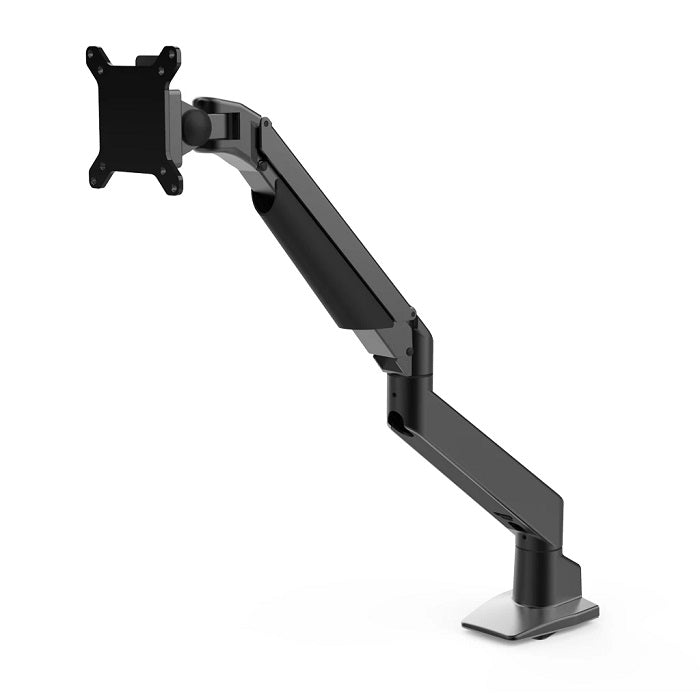
Desky Single Monitor Arm
A monitor mount, like our Single and Double monitor mounts, won't offer the same flexibility as monitor arms do. Although they are useful to level up your monitors, an arm will allow you more options. Whereas a monitor mount allows for height adjustment, an arm allows movement in three dimensions, as well as from landscape to portrait. For each person, the difference in height between sitting and standing will vary, so the ability to make easy height adjustments is key.
The reason monitor arms are so important is that they allow you to move your monitors to a position where your posture is optimised. In order to keep correct posture at your desk, you need your eyes level with the top of the monitor, with your arms bent at right angles reaching the top of your keyboard comfortably, sat upright, with a natural curve in the back.
If your monitor is too high or too low, the whole thing is knocked out of whack. A stooping position (with the monitor too low) will place strain on the neck and upper back, whereas too high and you'll strain your neck in the other direction. Over time this can lead to pain and discomfort. It can also lead to headaches and all manner of things you don't want while you're working.
The other major advantage is the ability to move position easily. The way you align to your desk when standing and sitting is different, so the ability to adjust your monitor's position easily allows you to switch seamlessly. Our arms also come with an inbuilt cable management system, which you may need to keep your workspace tidy.
What Should I Look For In A Monitor Arm?

Desky Dual Monitor Arm
When selecting a monitor arm, there's a few important things to look out for, and questions to ask. One we get asked all the time is: do monitor arms work with any monitor? The best monitor arm will be the one that suits you the best. The answer is not so simple. There is almost definitely a monitor arm that would fit your monitors, but they are not all the same.
For the vast majority of people though, our Desky Single Monitor Arm will do the job nicely, or if you have a multi monitor set up our Dual Monitor Arm will be more appropriate for you.
VESA Plate and VESA Compliance

Desky IMac Monitor Arm
VESA stands for Video Electronics Standards Association, who are the people who make sure monitors are VESA compliant, and designed the standard, 4 mount square VESA mounting configuration (which you can almost certainly see on the back of your monitor). The VESA hole pattern will look like they form a square. To find out if your computer monitor is VESA compatible, look for the square shaped hole patterns in the back. The VESA attachment will work for 95% percent of monitors, which is why all of our monitor arms use this standard unless otherwise specified. If your monitors are not VESA compliant, or you are unsure of the hole pattern, be sure to get in touch to see if we can help.
For users of the iMac, we have designed an iMac Monitor Arm with a specially engineered clamp, as these machines do not comply with the VESA standard.
Number Of Monitor Screens

Desky Dual Bar Monitor Arm
The amount of computer screens you use is of course going to have a big impact on how you set up your desk, and therefore the amount and types of monitor arms you might need. If you have a dual monitor setup, or even four monitors, you can still use arms for your computer monitors.
If you use two display screens and need to move them independently, then our Dual Monitor Arm mounts both screens on its own arm, meaning you have a full range of movements for both. Our Dual Bar Monitor Arm is the best choice to move your screens in concert.
For super complicated setups, we have added the Quad Monitor Arm, which allows a full range of movements for up to 4 screens on two tiers. And we will be adding a triple monitor arm to the range very soon!

Desky Quad Monitor Arm
Monitor Weight
The weight of your monitor is important, of course: however, with a weight capacity of 2-10kgs, unless your monitor is 20 yrs old, we're pretty sure our monitor arms will be able to take the strain.
Type Of Monitor Arm Mount
Monitor Arms with Grommet Mount or C-Clamp/Desk Clamp
So, which monitor desk mount to choose? Clamp or grommet? In fact, there are quite a few monitor bracket varieties, ways to desk mount monitors, and various types of monitor mounts in use. If your desk has grommet holes, then you will be able to use a monitor arm with a grommet mount, and attach the monitor arm using the existing hole. It is of course possible to cut your own grommet hole in the desk, if you have a workshop with which to do so.
For most whose desk doesn't have grommet holes though, a C clamp or desk clamp attachment will work best. Monitor arm clamps attach firmly around the back of the desk, or possibly the side, and allow you to alter the monitor's position in 3 dimensions, meaning you can move it closer if the back of the desk is too distant. This also frees up valuable desk space. A quick check of your desk should be enough to figure out which monitor mounts are best for you.
Wall Mount Monitor Arm
Alternatively, you could go wall mounted. If you know you're not moving your desk anytime soon, you can use a wall bracket (or wall monitor bracket) to mount your monitor arm on the wall above your desk. Wall mounts are a great way of keeping desk space free, and can be great for those who need to draw and use their PC during their workday. But even those who just need to save space can benefit from a wall mounted monitor.
Gaming Monitor Arms
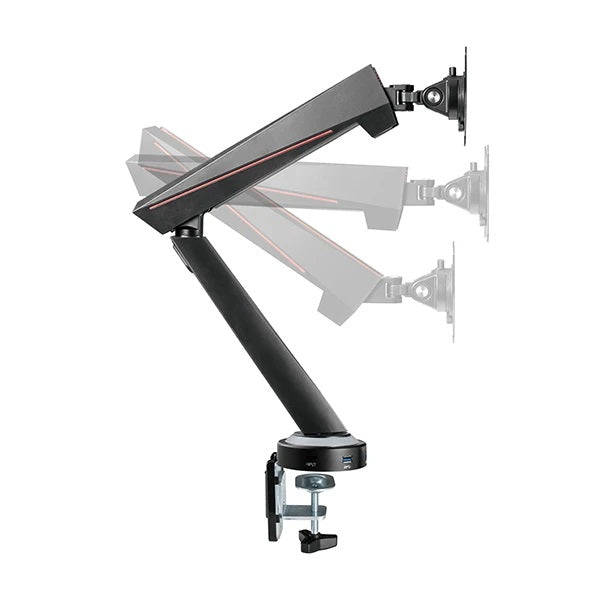
Desky Single LED Gaming Monitor Arm
Whether it's work or play, the positioning of your display screen is still crucial. When spending any length of time at your screen, you should be thinking posture posture posture. So you definitely need an adjustable monitor. Our gaming monitor arms allow you to optimise your position when playing, so you can enjoy your games pain free. Just like when working, it is crucial you keep the monitor at eye level, so if you change between sitting and standing while playing, a monitor arm will save both time in transition and pain in the long run.
Our gaming monitor arms do all of this, and have the added bonus of adding light and looking great. If you're looking for an lcd arm, our Single LED Gaming Monitor Arm will do for most, but if you're really serious check out our Dual LED Gaming Monitor Arm.
How Much Does A Monitor Arm Cost?
Monitor arms vary in price, and the more screens you need to elevate, the higher the price. That said, you can't put a price on your wellbeing, and saving yourself from pain and long term health concerns in the future is hard to put a price on.
A single monitor arm will be enough for most people, provide a huge amount of flexibility, and isn't going to break the bank. For multi monitor setups, we would always recommend investing too, as it's nearly impossible to achieve the correct posture otherwise (especially when changing positions). Whatever your budget, it's well worth considering a quality monitor arm.
How To Use A Monitor Arm
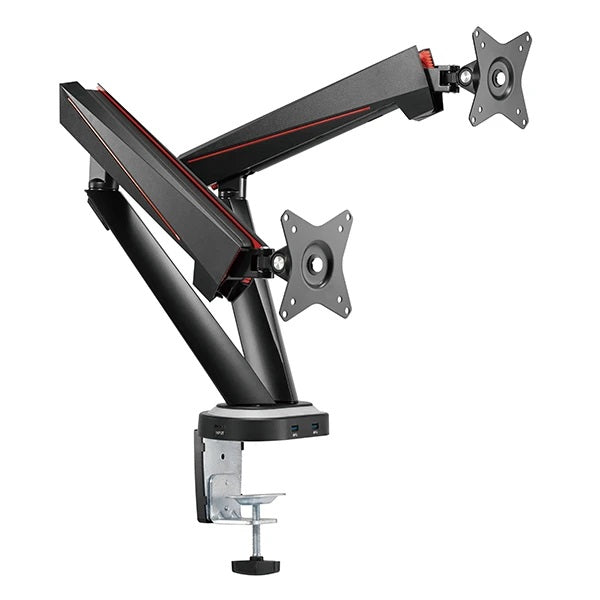
Desky Dual LED Gaming Monitor Arm
Fitting a monitor arm to your desk in the home office is of course no use if you don't know how to use it correctly. The position of everything in your workspace needs to be perfect relative to each other, so your monitor, keyboard and mouse must all be positioned correctly. Following the guidelines below will help you to get your computer monitor positioned correctly.
Should My Monitor Be High Or Low?
The ideal height for your monitor is with your eye level just below the top of the screen. Make sure your seated position is optimised too: that means you're sat with your back straight, and your seat at a level which allows your arms to reach the keyboard comfortably when bent at a right angle, with your upper arms parallel with your body. For this reason, a chair with height adjustment (ideally with gas springs so you avoid strain when you adjust the height) is basically essential.
Can A Monitor Be Too High?
Yes, your monitor can be too high. If you feel like you are in an unnatural position, and you're tilting your neck backwards to see your screen properly, then your monitor stand is too high. Over time this will strain the neck muscles, which have the onerous job of supporting your head (which is heavy), leading to a literal world of pain.
How Far Should Your Eyes Be From The Monitor?
How far you should you be from your monitor is, thankfully, very easy to measure. As a yardstick, the length of your arm is roughly the distance you want between your eyes and the monitor.
How Often Should You Look Away From Your Screen?
There are many schools of thought about this, but most people will accept the 20-20-20 rule as at least a good starting point. The 20-20-20 rule states that every 20 minutes, you should look at something 20 foot away for 20 seconds. This will help your eyes to reset and refocus, and should delay the onset of eyestrain.
If you need more help on setting up your desk and monitors, see our Home Office Setup Guide for great advice.
Monitor Mount Alternatives
Monitor Stands
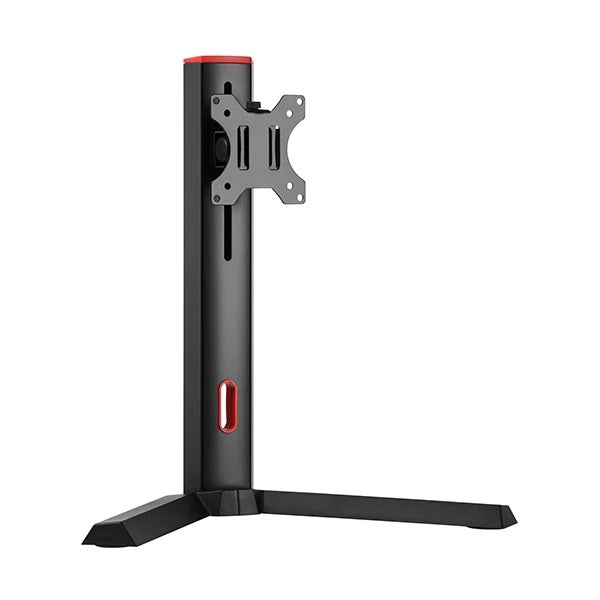
Desky Single Gaming Monitor Stand
If you don't feel like an arm is necessary for you, that's understandable. However, you should still be very mindful of your posture - even more so if you don't sit/stand, or otherwise vary your position. So investing in a monitor stand means you at least can make the odd height adjustment.
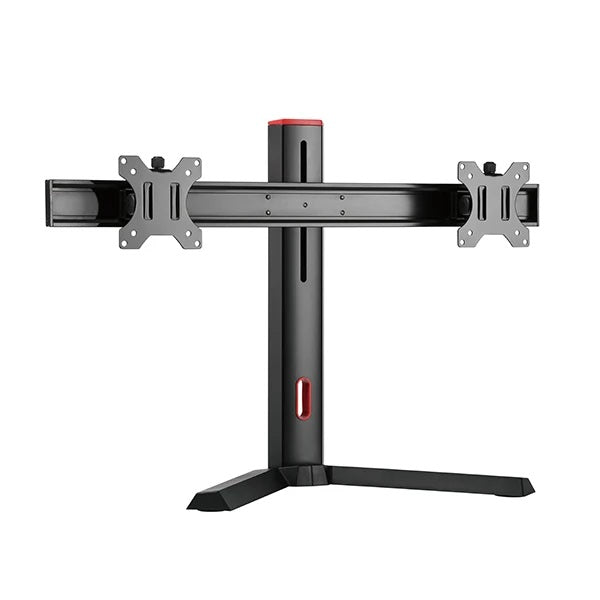
Desky Dual Gaming Monitor Stand
Our Single Gaming Monitor Stand allows you to adjust your monitor height easily, and is also appropriate for work. The Double Monitor Stand does the same thing, but for a pair of monitors, saving you from buying two stands. If you're interested in a monitor stand, check out our full range.
Monitor Risers
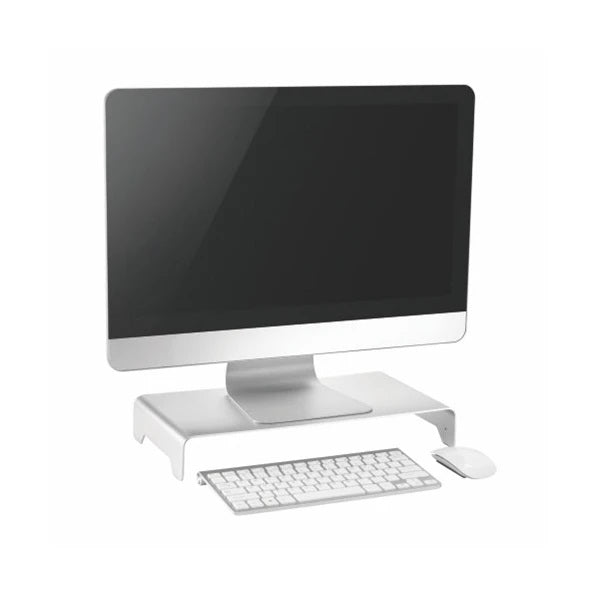
Desky Monitor Riser
Even more minimal than the monitor stand, our Monitor Riser can give your monitor a little boost if that's all it needs! Not so easy to change position, but if you only need to lock in your posture for a few hours at a time this can certainly do a job.
How Long Do Monitor Arms Last?
A good quality monitor arm should provide a good few years, but the amount of usage will be the biggest factor. What's not in doubt is that a well fitted monitor arm will allow you the flexibility to enjoy your work life free from pain, and help you to stay active, healthy and productive. Check out Desky's full range of monitor arms today to see how your setup and health could be boosted!
source https://desky.com.au/blogs/news/monitor-arm-buying-guide
Sunday, November 1, 2020
How To Sit At A Computer The Right Way: An Ergonomic Guide To Computer Workstations
With postural and musculoskeletal problems on the rise amongst office workers, finding the correct position at your workstation is more important than ever. Even more so now that many people are adjusting to working from home. Back pain is the number one complaint amongst people who sit most of the day. Luckily, learning how to keep good posture can help, and prevent future issues.
The position of your body relative to your desk and computer monitor is crucial. The type of desk you use, the positioning of your equipment, and the chair you sit in are all vital to get this right. Luckily we’ve covered everything, so you can work without the worry of strains and work-related injury.
How Should I Sit At My Desk?
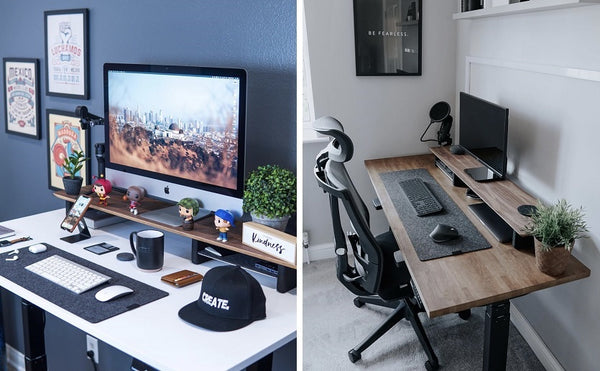 Maintaining the correct posture at your desk can save you a lot of grief. Knowing this is fine, but many of us do not know how best to sit at our workstations to help our body.
To maintain good posture you should aim for the following:
- Your body should be close to the desk.
- You should be upright, and not leaning backwards, arching the neck and spine.
- Knees should be lower than or level with the hips.
- Keep your feet flat on the floor (or footrest if one is being used).
- A gap of 1-2 inches between the knee and edge of the seat should be maintained.
- The angle between the things and trunk should be between 100 and 120 degrees.
- Shoulders should be relaxed and level, and elbows should be by your side.
- Make sure your eye level is 2-3 inches below the top of the monitor (or lower if you use bifocals).
The ideal position is not easy to achieve without the right equipment. An adjustable chair, and a desk which is designed for the purpose are essential if you are to protect yourself from aches, strains, RSI’s and back problems.
How To Set Up A Computer Workstation
If we imagine we’re building an ergonomic workstation from scratch, here are the basics you need plus a few options.
- Desk - Computer desk or standing desk.
- Ergonomic Chair - Could include sit/stand stool, active seating.
- Monitor riser or monitor arms - To correctly position your monitor or monitors.
- Footrest - if your feet cannot reach the ground in your optimum position relative to desk and monitor.
Computer Desks
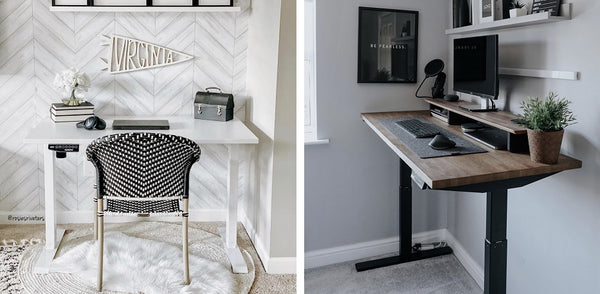 Computer desks are designed to accommodate a monitor and keyboard at a comfortable level for the user, often featuring a slide-out keyboard tray, and a large flat surface above for the computer, monitor and any other equipment.
They should be high enough that you can slide your chair underneath to get close to their workstation, with enough leg room underneath that a comfortable position can be maintained, with feet flat on the floor. Your eyes should be 2 to 3 inches below the top of the monitor, and arms should be level with the keyboard.
Height Adjustable Desks
Sit-stand desks and height-adjustable desks provide the option to change your position during the day, and are the best option for finding the ideal seated and standing position. As it is so important to change your posture during the day, a standing desk is a great option for many. Height adjustable desks have a whole host of other benefits too.
Benefits Of Height Adjustable Desks
The benefits of height adjustable desks start with the more obvious, postural plusses. As we’ve covered above, the angle and position you take relative to your monitor and keyboard is crucial to prevent RSI, general aches and pains, and more serious spinal problems.
 The ability to make micro-adjustments to the height of your desk makes it much easier to find and lock in your optimum body position and keep good posture. Making sure your monitor is level with your eyes, and your arms to your keyboard is much easier if you can alter the desk height with ease.
Changing your posture and position during the day also relieves strain on your muscles and joints, and one of the easiest ways to do this is to spend part of the day working standing up (or leaning on a stool). Height adjustable desks make this possible. See more in our guide on using a standing desk the right way.
Standing for part of the day is also a great way of spending less time sedentary: a key contributor to obesity and related health problems. Even better, standing leads to increased blood flow, which can boost energy levels and productivity.
How To Use A Height Adjustable Desk
Modern height-adjustable desks are super easy to operate, and most can be adjusted with the press of a button. They give you the option of moving from sitting to standing in a matter of seconds.
Most experts agree that roughly 30 minutes standing out of every hour is a good level to aim for. If you have never used a standing desk before, * it is recommended that you build up your standing time. Try standing ten minutes of each hour at first, and add 5 minutes at a time as you feel more comfortable.
Calculating Your Ideal Sitting and Standing Height
As a starting point for setting up the desk, we have included this table which shows the ideal sitting and standing heights relative to your height.

Remember that when standing, you will most likely be wearing shoes (if you’re working in the office). So factor the height of your shoes/heels into the equation. If you work from home or shoeless, of course, don’t worry.
Users of bifocal lenses will need their monitors slightly lower to accommodate the layout of the lenses. If you follow the guide and find you’re still not comfortable, feel free to adjust until you are.
Adjustable Office Chairs
Your chair takes the lead role in supporting your body, so a chair which can adapt to the many sizes and shapes we come in is crucial. A good chair can prevent upper back pain, lumbar issues, neck strain and RSI. That’s why an adjustable ergonomic chair that can be set up for your body is recommended. Below are three of the main features you should look for in an office chair.
 Seat Height
The ability to alter the chair height is crucial to allow you to find the optimum position. Most good quality adjustable chairs will have pneumatic or gas lift. Height should be set so your forearms reach your keyboard with your arms by your side and bent at a 90-degree angle at the elbow.
Backrest
The backrest should be height adjustable, to make sure both the lumbar region, lower back, upper back and your neck are properly supported. Many seats will have adjustable lumbar support, so the muscles in your lower back are fully supported. If the backrest has adjustable tilt, aim for a 100-120 degree angle between the trunk and thighs.
Armrests
If you have shoulder or neck strain, supporting the weight of your arms could be a contributing factor. However, it is important that your armrests do not prevent you moving your chair underneath the desk. You need to be able to get as close as possible to your computer, so if the armrests prevent this they should be lowered.
Footrest
If your feet do not reach the floor when seated on your chair, a footrest is a must. It will help you support some of your weight on your feet, minimising strain on the other core muscle groups in your back. Rests should have a non-slip, sloped surface, and grip the floor sufficiently to not move.
Lighting
Good lighting prevents eye strain, but also the bad postural habits we develop when leaning in for a better view. For writing and reading tasks, light should be relatively high, but computer tasks require a lower level.
How To Position Desk Equipment
The way we configure our desk layouts can make as much difference as the desks and chairs we choose. Below are some of the key things to consider when setting up your workstation.
 Setting Up Your Monitor
The placement of your monitor should be carefully considered:
- The screen should be directly in front.
- Set the screen between eye level, and no lower than with the top of the screen around 3 inches above eye level, to minimise eye fatigue.
- The screen should be roughly one arm’s length away from your eyes.
- Monitor risers and monitor arms should be used for greater flexibility of positioning.
Setting Up Multiple Monitors
If you use more than one monitor:
- If you have a primary monitor, this should be set up centrally so you face it. Secondary monitors should be set to one side, in a position where you can swivel your chair to see (without twisting your neck.
- If you use both equally, an arched configuration should be used.
- Multiple monitor arms and dual monitor arms provide the greatest positional flexibility.
How To Set Up Your Keyboard
Your keyboard should be directly in front of you, so you can type without twisting. With your arms by your side and your elbows bent at 90 degrees your fingers should reach the middle row of keys with your forearms flat and supported by the desk.
Touch (or floating) typists will normally set their keyboards slightly lower so they can hover over the keys. The armrests should be high enough to support the weight of their arms in this position.
Positioning Your Mouse Or Track Pad
Your mouse or trackpad should be as close to your keyboard as possible and at the same height. You might want to consider a slimline keyboard without the number pad to allow you to move your pointer closer in.
Laptop Computer Placement
Laptops are not ideal for long term use on their own, but if you do need to use one, consider adding an external monitor, or external keyboard and mouse. Coupled with a laptop riser or monitor arms, it is still possible to find a safe position.

Document Positioning
Any documents you are working with should be placed as close to the monitor as possible and in the same eye line. This minimises the movement in the neck when working.
If you are looking at the document more than the screen, consider placing the document centrally and shifting your monitor to one side.
Telephone Position
Telephones should be placed centrally and no more than an arms-length away, to prevent stretching and twisting. If working in an environment that receives a high volume of calls, the use of headsets is recommended to save workers from the strain of repeatedly picking up, and holding the phone for long periods.
What Do I Do If My Desk Is Too High?
If your desk is too high, you can try raising your chair. If your feet don't reach the floor, use a footrest. It is important that you find the correct level relative to your computer setup to avoid strains. If the ideal position, with your arms level with your keyboard and eyes level with your monitor, is not attainable, you should consider a sit-stand desk.
This will allow you the flexibility to find your ideal seated position.
How Do You Counteract Sitting At A Desk All Day?
Even in the optimum position, sitting in the same posture all day is still problematic. The best way to counteract this is to change your posture as often as possible. Most problems occur when one muscle group is overused, so sharing the strain across muscle groups can make a huge difference.

There are many ways you can do this. Rotating your tasks can help, allowing you to build more active jobs in throughout the day. Taking short breaks every 30 minutes to get out of your chair and walk around will keep your joints moving, boost blood flow and let your body reset. If you work in a busy environment where you are often tied to your desk though, this might not be possible.
Height adjustable desks remain one of the best ways to alter your posture and keep active during the workday. They actively encourage users to vary their posture during the day, and they are known to be effective in relieving back pain and other workplace ailments. They also make achieving the correct posture much easier, whether it’s seated or standing, which prevents injuries occurring in the first place. View Desky's range of standing desks today and improve your health at the workplace.
source https://desky.com.au/blogs/news/how-to-sit-at-a-computer-the-right-way
Subscribe to:
Posts (Atom)
Your New Favorite Standing Desk - That's Desky!
Watch video on YouTube here: https://youtu.be/5dA6jh4aHpU
-
Learning to program the control panel of your Desky Dual with preset heights? We’re here with this guide to help, with a few tips to make yo...
-
Looking to reset your Desky Dual for the first time? We’re here to help with a few tips that will make your Desky life simple. Whether you j...
-
Choosing between a dual motor or single motor standing desk can be tricky when you're not quite sure what the differences are. The quest...


